THIS IS FEATURED POST 1 TITLE

THIS IS FEATURED POST 1 TITLE

Lorem ipsum dolor sit amet, consectetur adipisicing elit, sed do eiusmod tempor incididunt ut labore et dolore magna aliqua. Ut enim ad minim veniam

Quas molestias excepturi
THIS IS FEATURED POST 2 TITLE

THIS IS FEATURED POST 2 TITLE

Lorem ipsum dolor sit amet, consectetur adipisicing elit, sed do eiusmod tempor incididunt ut labore et dolore magna aliqua. Ut enim ad minim veniam

Impedit quo minus id
THIS IS FEATURED POST 3 TITLE

Step By Step Instal Custom Rom Di Galaxy Young


aguss007 | 14.22 | ,

 Selamat siang warga  kampoeng Android, gimana punya kabar, pastinya baik kan hehehehe, pada kesempatan kali ini saya akan mencoba menulis Step By Step Instal Custom Rom Di Galaxy Young,

* Upgrade Baseband/Firmware/Stock Rom
1. Download dan install driver: SAMSUNG_USB.rar
2. Download s5360-odin.rar | Mirror
3. Download firmware: S5360DDKK1_S5360ODDKJ3.rar (mutiple files) atau download dari sammobile.com  koleksi ada disini
.4. Download Totoro 0623.pit
..
Setelah persiapan di atas dio download tinggal prakteknya saja :
1. Pastikan baterai smartphone telah di charge PENUH atau minimal 90%
2. Matikan smartphone Galaxy Y (sampai benar-benar off — layar berwarna hitam — bukan warna abu-abu).
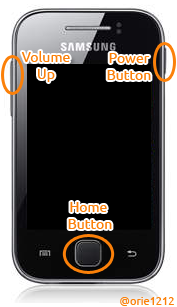
3. Tekan tombol Volume Down, Home Button, dan Power Button secara bersamaan.
>> terus tekan sampai muncul gambar seperti ini:
>> Tekan tombol Volume Up, maka akan muncul tampilan seperti pada gambar di bawah ini,
4. Hubungkan smartphone Galaxy Y ke Komputer melalui kabel data USB.
5. Jalankan aplikasi Odin3 v1.85.exe
>> Pastikan smartphone Galaxy Y Anda Added!!! Seperti pada gambar di atas – yang dilingkari. Untuk port COM 4  bisa saja berbeda, punya Anda COM 3, COM 5, atau yang lainnya. Yang pasti terblok warna kuning seperti itu.
6. Klik tombol PIT dan cari file totoro_0623.pit lalu Open.
7. Uncheck Re-Partition (Pilihan yang paling aman untuk downgrade atau upgrade firmware),
8. Masukkan file-file firmware-nya:
BOOTLOADER: DefaultCalDataWithBoot_S5360XXXXX_REV05.tar.md5
PDA : PDA_S5360XXXXX_REV05.tar.md5
PHONE : MODEM_S5360XXXXX_REV05.tar.md5
CSC : GT-S5360-MULTI-CSC-OXXXXX.tar.md5
9. Klik tombol Start.
10. Tunggu proses flashing sampai selesai, yaitu sampai muncul tulisan PASS! (Biasanya memakan waktu tidak lebih dari 1 menit).
11. Close aplikasi Odin3 dan lepaskan kabel data Galaxy Y dari komputer.
..

~Sobat telah berhasil Upgrade~

..
Jika smartphone Galaxy Y Anda bootlooping (nge restart terus dan cuma muncul Logo Samsung – tidak masuk2 ke Tampilan Utama), silahkan di wipe data / factory reset ! Caranya:
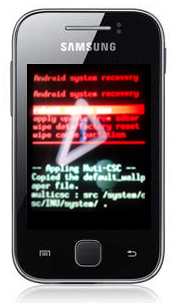
1. Masuk ke Recovery Mode, yaitu dengan menekan tombol Volume Up, Power Button dan Home Button secara bersamaan.
>> terus tekan sampai muncul gambar seperti ini:
>> Ada pilihan,
  • reboot system now
  • apply update from sdcard
  • wipe data/factory reset
  • wipe cache partition
>> Tombol yang digunakan,
  • Volume Down = untuk menggerakkan ke bawah.
  • Volume Up = untuk menggerakkan ke atas.
  • Home Button = untuk memilih menu (OK).
  • Back Key = untuk kembali.
2. Pilih menu wipe data/factory reset, dengan cara menekan tombol Volume Down, kemudian tekan Home Button. Kemudian pilih Yes — delete all …
3. Terakhir pilih menu reboot system now .

Setelah langkah diatas selesai dan succes kita lanjut ke langkah berikut wew

*Instal CWM <ClockWordMod>

1.  Download file untuk program CWM Disini. http://www.mediafire.com/?pxabutfybd76t6w
untuk CWM saya coba ini http://dl.dropbox.com/u/58284539/CWM_bla_bla.zip dan mantabs
2.  Letakkan file tersebut di SD Card.Ingat ! . Jangan diletakkan di dalam folder.
3.  Masuk ke Recovery Mode
Ingat ya. Ikuti langkah untuk masuk ke recovery mode saja !!
4.  Pilih Update from SD Card.
5.  Pilih file yang sudah di download tadi

Nah setelah isntal CWM kini saatnya pasang Custom Rom yang sobat  inginkan 

* Instal Custom Rom

Sebenarnya pada intinya instal Custom Rom ini tergantung pada Custom Rom tersebut tapi kebanyakan sekarang sudah memakai CWM instalnya 

1. Matikan handphonenya, kemudian nyalakan kembali ke modus recovery dengan cara menekan tombol volume up/+, tombol home, dan tombol power. Tekan bersamaan, kemudian tahan dan tunggu sampai ada tulisan Samsung Galaxy Young kemudian lepaskan.

Dilayar akan tampil seperti gambar di bawah ini:
100_0618 100_0618

2. Pilih menu “apply update from sdcard” dan pilih file xxxxx.zip  kemudian tampilan menu recovery ClockWorkMod Recovery seperti gambar di bawah ini :

100_0619

3. pada menu ClockworkMod Recovery kemudian kita memilih menu “install zip from sd” berikut tampilannya …

100_0620
4. pilih menu “Repencis V3.0 pro-us” kemudian pilihan memastikan, Yes Install! biarkan proses berjalan, dan tunggu sampai ada tulisan “Instalation Complete, Enjoy!”


100_0622 100_0623

5. Setelah proses flashing selesai dan complete, menu tampilan akan kembali pada tampilan seperti di bawah ini setelah itu tekan tombol power 1 kali saja, untuk kembali ke menu awal, pada menu CWM Recovery pilih menu "do Wipe Data" dan menu "Wipe Cache Partition" kemudian pilih menu “Reboot system now”

100_0624

6. Booting….

100_0626

7. Anda sudah mengganti ROM Samsung Galaxy Y anda dengan Repencis v.3

100_0628

8. REPENCIS V.3 Code Tiga

100_0632   100_0632

9. Wallpaper SUN CELLULAR 
100_0631


BILA MERASA ARTIKEL INI BERMANFAAT DAN MAU DI COPY KE WEB TEMAN-TEMAN SAYA MOHON SERTAKAN NAMA WEB SITE YANG ANDA COPY 

Sobat Join Kesini yuk "Kampoeng Android Community"
mari kita berbagi ilmu disini

AfterFocus Pro v1.2.1


aguss007 | 14.45 |


With AfterFocus, you can create DSLR-style background blurred photo by simply selecting focus area. Also, various filter effects offer you to create the most natural and realistic photo.
Selecting a focus area more precisely, you can achieve more natural and professional image.

Just mark the areas you want, AfterFocus automatically recognizes the focus area precisely even for an object with complex shapes.

This auto function allows you to work faster on smart phones with small screen.
Also, background blur effect of AfterFocus gives a photo the realistic look between the edge of the background and the focus area.


With our realistic filter effects, you will enjoy photographing and photo editing even more, and share them on SNS easily.

1. Smart focus area selection
Simply draw some lines inside a focus area and the background, then AfterFocus will automatically recognize the focus area. You can also select the area with traditional finger painting.

2. Background Blur effect
You can create the most realistic blur effect with various aperture styles just like DSLR camera.
To emphasize that certain things move, Motion blur effect is also available.

3. Filter effect
AfterFocus offers from basic effects to professional effects like Cross Process without looking artificial.
Also, you can emphasize the spot light on the background using Bokeh effect.

4. Double photo
Take a picture of one object and move slightly to the right to take another picture of the same object, and it will analyze the images and recognize the nearest object, so there is no need to draw the focus area.
(Make sure that the background and the distance of the object are far enough and have clear texture to get a great result.)

5. Easy share
You can share through e-mails and SNS easily and simply.


password: myandroid007.blogspot.com

BILA MERASA ARTIKEL INI BERMANFAAT DAN MAU DI COPY KE WEB TEMAN-TEMAN SAYA MOHON SERTAKAN NAMA WEB SITE YANG ANDA COPY 

Sobat Join Kesini yuk "Kampoeng Android Community"
mari kita berbagi ilmu disini

Root Uninstaller Pro v2.9


aguss007 | 14.12 |


Don't like stock or system applications? It's for you. This application can freeze pre-installed applications on your phone and more.
Very fast and simple uninstaller tool on single click for uninstalling both SYSTEM and REGULAR applications.

NEW: Hide app mode: Launch a frozen app and automatically re-freeze on app closing (Pro only)


For ROOT+NAND unlocked devices:
    Uninstall system applications
    Freeze or disable bloatware, stock and regular applications (keep updates)
    Defrost or enable applications (Free trial or PRO)
    Backup system application .apk to sdcard (that can reinstall later)
    Restore backed up applications
    Reset applications to fresh install state
    Delete definitively system applications
    Hide my App: launch a frozen app and automatically re-freeze on app closing (Pro only, tap on Launch->Freeze button )


For NON-ROOT devices:
    Quick APK list to show all available .APK files on SDCard
    Keep Market reference and can restore after factory reset/change devices
    Manage to clear data, cache (manually)
    Manage .apk files: delete, install, install as a system app (PRO)
    Single click to uninstall a listed applications (Batch uninstall).
    Rapid load application list
    Display application name, icon, package name
    Exclude system applications (that you can not uninstall)
    Filter by third-party applications, system applications, applications on sdcard. backup applications or frozen applications
    Support large screen (ex. tablet) views

What's in this version: (Updated Jun 4, 2012)
    Improve app list loader


password: myandroid007.blogspot.com

BILA MERASA ARTIKEL INI BERMANFAAT DAN MAU DI COPY KE WEB TEMAN-TEMAN SAYA MOHON SERTAKAN NAMA WEB SITE YANG ANDA COPY 

Sobat Join Kesini yuk "Kampoeng Android Community"
mari kita berbagi ilmu disini

Android Voice Xtreme v2.13


aguss007 | 13.39 |


Who should use AVX? If you are looking for an application that provides hands-free operation of your phone to open apps, read and reply to text messages and email, schedule calendar events and many more functions that you can perform using just your voice then AVX is right for you.

If you are just looking for an electronic friend to chat with then please go with one of the Siri clones. On the other hand if you want a real virtual assistant that has useful functions that will make your life easier then please give AVX a try.

AVX has all the functions you'd expect your assistant to perform plus some that you probably never new were possible. Here is a list of some of the functions that you wont find in most of the competition:


Features:
    Reading and replying to incoming text and email including Microsoft Exchange
    Integration with Evernote
    Home Automation with INSTEON. Turn on the lights and appliances, open the garage door and a whole lot more, all with voice commands or scheduled or based on your location.
    Location based reminders. Remind you to do something based on your location.
    Location based actions. Perform any function that AVX can do based on your current location. Have AVX automatically text your wife when you leave the office.
    Time based actions. Perform any function that AVX can do on a set day and time
    In car mode including wake up phrase
    Custom voice shortcuts to your phone applications. Give your apps any name you want and open them using that name.
    Voice bookmarks to your favorite web sites. Give your bookmarks any name you want and open them using that name.
    Activate just by shaking your phone
    Works with all Bluetooth Headsets

For the full online manual please go to: www.bulletproof.com/avx

What's in this version : (Updated : Jun 2, 2012)
    Video Channel: http://www.youtube.com/user/Ausiguy1/videos
    BATTERY USAGE IMPROVEMENTS
    INTEGRATION WITH TASKER (NEW VIDEO)
    QUICK START HELP MENU
    HANDS-FREE READ AND REPLY TO FACEBOOK FEED AND SEVERAL OTHER FACEBOOK UNCTIONS - SEE NEW VIDEO
    SPEAK AND PROMPT MESSAGE MODE
    IMPROVED SCREEN LOCK/WAKE WITH PROFILES
    CLEANER SETTINGS LAYOUT
    NEW VIDEO FOR USING PROFILES
    NEW SETTINGS PROFILES
    EVERNOTE INTEGRATION
    MICROSOFT EXCHANGE INTEGRATION


password: myandroid007.blogspot.com

BILA MERASA ARTIKEL INI BERMANFAAT DAN MAU DI COPY KE WEB TEMAN-TEMAN SAYA MOHON SERTAKAN NAMA WEB SITE YANG ANDA COPY 

Sobat Join Kesini yuk "Kampoeng Android Community"
mari kita berbagi ilmu disini

*