THIS IS FEATURED POST 1 TITLE

THIS IS FEATURED POST 1 TITLE

Lorem ipsum dolor sit amet, consectetur adipisicing elit, sed do eiusmod tempor incididunt ut labore et dolore magna aliqua. Ut enim ad minim veniam

Quas molestias excepturi
THIS IS FEATURED POST 2 TITLE

THIS IS FEATURED POST 2 TITLE

Lorem ipsum dolor sit amet, consectetur adipisicing elit, sed do eiusmod tempor incididunt ut labore et dolore magna aliqua. Ut enim ad minim veniam

Impedit quo minus id
THIS IS FEATURED POST 3 TITLE

BubbleUPnP Pro v1.4.4


aguss007 | 11.43 |


Play easily your music and videos on your phone and devices on your network (DLNA TVs, XMBC, WMP, ...) from your eQxternal UPnP Media Servers. Play your phone/tablet media to those devices.
Browse and play your local phone/tablet media from other devices (PS3, ...).

Optional Internet Streaming:
More than just regular LAN streaming, BubbleUPnP can also stream efficiently your media via the Internet over a mobile or WiFi connection. Internet streaming requires installing server software "BubbleUPnP Server" running on Windows, MacOS X, Linux or a NAS (it is not required for regular LAN streaming, see NOTE below). To learn more about BubbleUPnP Server and Internet streaming visit http://bubbleguuum.free.fr/upnpserver


Features:
    Tablet support
    stream music and videos from your UPnP/DLNA Media Server (Twonky, Asset UPnP, any NAS with UPnP, ...) to your Android device.
    Codecs supported for audio: with system decoders: MP3, AAC (without DRM), WMA, Ogg Vorbis. With custom decoders WAV, FLAC, ALAC, LPCM. WMA support is manufacturer and model dependent. Vorbis may not work on Android 2.1/2.2.
    Video playback is delagated to an external app (VPlayer, MoboPlayer, DicePlayer,...)
    stream music/videos from your UPnP/DLNA Media Server to your UPnP renderers (software or hardware) on your network with regular playback controls (play, pause, seek, volume, ...).
    UPnP Media Server (*** requires Android 2.2+ ***): play your local phone/tablet media to other devices or to your Android device (standalone media player). Browse and play your local phone/tablet media from other devices (PS3, WMP, ...). Able to browse Filesystem (SD Card) in licensed version.
    UPnP renderer: control audio playback of your android device from another UPnP Control point
    Internet streaming/downloading over a mobile or WiFi connection with BubbleUPnP Server
    UPnP tethering with BubbleUPnP Server (makes Media Servers from a LAN visible on another LAN)
    Download tracks, full albums and videos from your Media Server to your android device (with covers if available), to make them available in your favorite Android music and media player
    Landscape mode
    Now Playing screen with regular playback controls
    Mute / Repeat / Shuffle
    Editable playlist to queue tracks for playback
    Load and save playlists
    Shuffle Playlist
    Shuffle Library (shuffle tracks from your entire Media Server)
    Scrobbling support
    Sleep Timer
    Display album art
    Display artist info from Discogs or Last.fm (require Last.fm app)
    Powerful UPnP Search. Search for tracks, albums, artists and videos (exact support depends on Media Server)
    Bookmarks. Access quickly albums and folders
    Random track list generation. Discover forgotten gems in your Library
    Multiple selection. Anywhere a list of tracks or albums appear you can swipe many of them to apply a Common operation (play, enqueue, remove, download,...).
    Control Renderer volume with the hardware volume buttons

What's in this version : (Updated : Jul 7, 2012)
    Local media server can be browsed from Xbox 360 for playing from the Xbox
    App registers in the Share menu of other apps for media items (eg: Gallery app)
    Loc med serv folders can be bookmarked
    added M3U, PLS, ASX, XSPF support from web browser and "Add Stream URL"
    Added "Smart Sort" option to override Media Server default sort order
    Workarounded device bugs
    Fixed Shoutcast proxy not working with some renderers
    Fixed loc. med. serv. not browsable from XBMC
    Fixed obscure crashes
    Other fixes


password: myandroid007.blogspot.com

BILA MERASA ARTIKEL INI BERMANFAAT DAN MAU DI COPY KE WEB TEMAN-TEMAN SAYA MOHON SERTAKAN NAMA WEB SITE YANG ANDA COPY 

Sobat Join Kesini yuk "Kampoeng Android Community"
mari kita berbagi ilmu disini

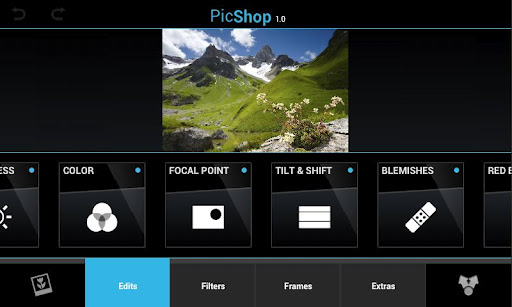
PicShop - Photo Editor v2.2


aguss007 | 11.19 |


Beautiful design combined with tons of editing options and dozen's of filters make this the premier mobile editing suite on the market. You will love this app!
With support for HD images up to 8MP, PicShop is great for serious photographers as well as casual.

We've integrated social sharing right into the app, so you can to post to Facebook, Twitter or Email with a
single click!


Features:
    Full Editing Suite
    Filters and Effects
    Frames and Overlays
    Sketch Mode w/ 8 different brushes
    Meme Maker (YES RLY)
    Speech Bubbles
    Text w/ Adjustable Font
     Fun Stickers (Hats, Moustaches, Love etc)
    Social Integration (Facebook, Twitter, Email)
    Customize app with your own personal theme

EDITING SUITE
    Color / Saturation
    Brightness / Contrast
    Sharpen / Blur
    Tilt Shift
    Depth of Field
    Blemish Remover
    edEye Remover
    Auto-Correction
    Crop
    Rotate
    Flip

What's in this version : (Updated : Jul 7, 2012)
    Zoom while editing (Great for Blemish/RedEye Removal!)
    Color Blending for Focus Editor
    Color Blending for Tilt-Shift Editor
    New Borders w/ adjustable Colors
    "Rule of Thirds" grid in Crop View
    Additional Crop Aspect Ratio's
    New FishEye Lens
    BgFill
    Image Layers
    Fixes
        Reduced crashes on some devices
        Fixed bugs when cropping Portrait Images
        Fixed Blemish Bug with white fill
        Fixed Crop / Tilt / Focus positioning bugs in Portrait


password: myandroid007.blogspot.com

BILA MERASA ARTIKEL INI BERMANFAAT DAN MAU DI COPY KE WEB TEMAN-TEMAN SAYA MOHON SERTAKAN NAMA WEB SITE YANG ANDA COPY 

Sobat Join Kesini yuk "Kampoeng Android Community"
mari kita berbagi ilmu disini

Unified Remote Full v2.4.2


aguss007 | 11.16 |


Easily the most feature-filled Android-PC remote. Turns your Android device into a WiFi or Bluetooth remote control for your Windows PC. Control your favorite programs, mouse, and keyboard.

DOWNLOAD SERVER V2: www.unifiedremote.com

SUPPORT
http://unifiedremote.com/support
http://support.unifiedremote.com/

Please try the free version before you buy the full version. Please let us know if you have any problems upgrading from the free version to the full version.


 Features:
    Custom Remotes
    WiFi (TCP/UDP)
    Bluetooth
    Easy server and app setup
    Comprehensive server manager
    Automatic server detection
    Clear connection troubleshooting
    Custom/Android keyboard support
    Single/Multi touch mouse
    Hardware volume control
    Quick Switch using swipe gestures
    Quickly change servers
    Auto-pause media for phone calls
    Homescreen shortcuts to remotes
    Wake On Lan
    Server password protection
    256-bit AES encryption
    Voice commands

Free VersionFeatures:
    Basic Input
    File Manager
    Keyboard
    Media
    Power
    Slide Show
    Spotify
    Start
    Task Manager
    Windows Media Center
    Windows Media Player
    VLC (Keyboard)
    YouTube

Full Version Features:

    Custom Remotes
    Boxee (Keyboard)
    Boxee (Web)
    Chrome
    Firefox
    foobar2000
    Hulu Desktop
    Hulu Web
    Internet Explorer
    iTunes
    J River Media Center
    Monitor
    Media Portal
    MediaMonkey
    MPC HC
    Netflix
    Opera
    Pandora
    Picasa
    PowerPoint Advanced
    PowerPoint Basic
    Send Text
    Spotify Advanced
    Tellstick
    USB-UIRT Helper
    Winamp
    Windows Photo Viewer
    VLC (Web)
    XBMC (Keyboard)
    XBMC (Web)
    XBMC Media

What's in this version : (Updated : Jul 5, 2012)
    Press and hold repeat.
    Various crashes.
    Custom remote icons.


password: myandroid007.blogspot.com

BILA MERASA ARTIKEL INI BERMANFAAT DAN MAU DI COPY KE WEB TEMAN-TEMAN SAYA MOHON SERTAKAN NAMA WEB SITE YANG ANDA COPY 

Sobat Join Kesini yuk "Kampoeng Android Community"
mari kita berbagi ilmu disini
WiFi File Transfer Pro v1.0.2


aguss007 | 11.12 |


Upload and download files to/from your phone over a wireless connection.
WiFi File Transfer is a light-weight web server that lets you upload and download files to/from your phone or tablet over a wireless connection. Transfer files without a USB cable.


Features:
    Upload or download multiple files at once
    Delete, rename, copy, zip or unzip files
    Compatible with all modern operating systems that provide a web browser (Windows, Mac OS, Linux etc.)
    Password authentication (optional)
    Shortcuts to photo, video and music directories
    Runs as a background service
    View photos directly in your web browser

NOTE
    In order to use this app, your computer and your phone need to be on the same local area network.
    If you would like to use this app on public WiFi networks, please make sure to set an access password in the app settings.

What's in this version : (Updated : )
    Fewer permissions needed :)
    Now works while in hotspot mode (experimental)
    Better speeds on some ICS devices
    Can now select blocks of files by using Shift key
    Added Delete hot key
    Added Logout link
    Restored rounded corners in Firefox
    More languages


password: myandroid007.blogspot.com

BILA MERASA ARTIKEL INI BERMANFAAT DAN MAU DI COPY KE WEB TEMAN-TEMAN SAYA MOHON SERTAKAN NAMA WEB SITE YANG ANDA COPY 

Sobat Join Kesini yuk "Kampoeng Android Community"
mari kita berbagi ilmu disini,/div>

CameraPro (CameraX) 2.0 v2.17


aguss007 | 11.04 |


CameraPro (previously known as "CameraX") offers fast access to your mobile's camera capturing and video recording features. It is highly customizable including different designs and menu arrangements. Pictures can be directly uploaded from CameraPro to Facebook, Flickr, Picasa, and Twitter.

The following list gives an overview over the features. PLEASE NOTE that features marked with "*" vary between different phone models!

Camera Modes:
    Still (normal mode)
    !!!BETA!!!: Video / expert video mode (HD video greater than 720x480p is in Beta and works only on some phone models)
    Self-timer
    Time-lapse: record time-lapse picture series (Android 3.0+: record time-lapse videos too)
    Burst: shoot a set of pictures as fast as the phone supports
    Bracketing: take up to 10(!) different exposed images (can be used for HDR stitching with other apps)
    Anti-shake: take pictures exactly in the moment when the phone is not moving

Picture contols:
    Focus (autofocus, macro, infinity, continuous autofocus, face detection,...)*
    White balance*
    Flash (including videolight)*
    Effects (such as mono, negative, solarize, aqua,...)*
    Scene modes (night, landscape, portrait, beach, snow, fireworks, sports, party, candlelight, text,...)*
    Image controls (exposure compensation, brightness, contrast, sharpness, saturation)*
    ISO*
    Metering mode*
    Antibanding*


Overlays
    Grid (customizable)
    Level meter/virtual horizon with indicator*
    Compass*
    Touch focus (Android 4+)*
    Zooming*

Expert video mode (excerpt)
    Automatic bypassing of recording time respectively file size limit by means of file splitting (short gap possible between files)
    Disable audio recording
    Adjust audio channels, sampling rate, audio/video bitrates, frame rates, audio/video codecs, video container format, video dimensions*
    Supports 1080p video recording (e.g. Galaxy S2)*

Settings (excerpt)
    Use volume keys, hardware shutter, trackball, and touch buttons for capturing and focusing*
    Set CameraPro as default camera app*
    Disable shutter sound
    Fullscreen viewfinder*
    Back/front camera (front camera does not support video recording yet)*
    Image compression quality
    Different arbitrary storage locations for video and photos including customizable filenames

IMPORTANT LIMITATIONS
    For video resolutions greater than 720x480 set focus mode to "Continuous" if available. Else recording might start delayed (app looks as if it hangs for some seconds on the Samsung Galaxy S2)
    Zooming and picture controls can only be modified BEFORE video recording
    Changing from continuous autofocus to some other focus mode can be very slow
    Sometimes the direct HD video preview in the video player (started from CameraPro) shows only a black screen. When the player is started manually the video play back is fine.
    If updating from CameraX fails, uninstall CameraX before installing CameraPro.
    Video recording on some HTC devices and on all devices with Android 2.2 and older is only partly supported

HTC/Distorted Pictures:
    Some still picure resolutions on some HTC devices are distored (e.g. 16:9 resolutions). Enable the "HTC fix" under settings to fix.


LG/Viewfinder orientation:
    On some devices the viewfinder orientation is wrong (e.g. LG P500). Enable "Orientation fix" under settings to fix.

What's in this version : (Updated : Jul 8, 2012)
    Added option to overwrite EXIF date
    Bug fixes


password: myandroid007.blogspot.com

BILA MERASA ARTIKEL INI BERMANFAAT DAN MAU DI COPY KE WEB TEMAN-TEMAN SAYA MOHON SERTAKAN NAMA WEB SITE YANG ANDA COPY 

Sobat Join Kesini yuk "Kampoeng Android Community"
mari kita berbagi ilmu disini

SMS Locker v1.0


aguss007 | 10.57 |


With SMS locker, you can block all messages that are received and sent messages. This application secures all incoming messages, and also offers you an option to reply to these messages, and also the option to send other messages, which are also secure. The application has a password, so access to these messages is protected.

Messages are stored in an encrypted database, so it can be said that the application is completely secured.

SMS Locker is very secure as it can be seen the photo gallery of people who wanted to enter the application using the wrong password.

It can be changed the alert sound when entering an incorrect password, and also changed the sound when you receive a new SMS.


With this application we can create another profile that is fake, that is a way to hide personal messages.

You can change the passwords both of the basic profile and of the fake profile.

With SMS Locker you can send messages and the receiver can see the Location using GPS (Global Positioning System).

Note:
    This application is not supported by the devices using Android version less than 2.3, i.e. API 9.


password: myandroid007.blogspot.com

BILA MERASA ARTIKEL INI BERMANFAAT DAN MAU DI COPY KE WEB TEMAN-TEMAN SAYA MOHON SERTAKAN NAMA WEB SITE YANG ANDA COPY 

Sobat Join Kesini yuk "Kampoeng Android Community"
mari kita berbagi ilmu disini

*