THIS IS FEATURED POST 1 TITLE

THIS IS FEATURED POST 1 TITLE

Lorem ipsum dolor sit amet, consectetur adipisicing elit, sed do eiusmod tempor incididunt ut labore et dolore magna aliqua. Ut enim ad minim veniam

Quas molestias excepturi
THIS IS FEATURED POST 2 TITLE

THIS IS FEATURED POST 2 TITLE

Lorem ipsum dolor sit amet, consectetur adipisicing elit, sed do eiusmod tempor incididunt ut labore et dolore magna aliqua. Ut enim ad minim veniam

Impedit quo minus id
THIS IS FEATURED POST 3 TITLE

MP3dit Pro v1.1.1


aguss007 | 12.03 |


MP3dit is a tag editor for MP3 files. This app can search for album art; fix split albums and song order; and change the artist, album and genre of all your songs. MP3dit can also edit entire albums or groups of files at the same time.

Extremely easy to use, MP3dit is a fully functional app that has the features professionals require yet it’s easy to download and use!

This is the Pro version, which is Ad free, and will get early access to new features!

Coming soon...
support for WAV, MP4, Ogg Vorbis, Flac and WMA

What's in this version : (Updated : May 25, 2012)

    Added button scrolling to the main menu.
    Added a new landscape view for the main menu.

Required Android O/S : 2.2+


password: myandroid007.blogspot.com

BILA MERASA ARTIKEL INI BERMANFAAT DAN MAU DI COPY KE WEB TEMAN-TEMAN SAYA MOHON SERTAKAN NAMA WEB SITE YANG ANDA COPY 

Sobat Join Kesini yuk "Kampoeng Android Community"
mari kita berbagi ilmu disini

Ultimate Call Screen HD Pro v5.0.0


aguss007 | 12.00 |


Ultimate Call Screen HD Free combines a Fullscreen Caller ID replacement, contact picture manager, call blocker, and, on top of that, sensor-base actions such as rejecting calls by turning the phone screen-down, and swipe gestures just to be sure you handle your phone any way you want to.

Licensed users can link phone contacts to Facebook profiles, and*use their HD profile pictures as call screens. Also with the License comes Ultimate SMS Screen, the name says it all.

All this on the same package, working from Android V2.1 to ICS, on any resolution on any phone.

There is no limit on the number of contacts you can personalize or block on the Free version. There are no adds and no timeouts. I believe on added functionality for value, not crippling the app to force buys.

Important:
To access the dialpad and other standard functions, press "back" button while on a call, or use the enable the "swipe down" feature to do the same

Feature:
General:

    No limit on number of contacts to personalize.
    Apply pictures to contacts directly from your gallery, with the android "share" function. Just choose "Add to UCS"!

Full Screen Caller ID

    Selectively enable only for outgoing/incoming calls
    Enable swipe gestures to bring up the default phone interface
    Press "Back" when UCS is handling a call to jump back to your default phone interface
    Choose pictures from gallery or take from camera
    Image cropper with multi-touch zooming
    Per-contact blocking
    Preview each contact callscreen
    Define a global default HD picture for those contacts you don't feel like personalizing
    Optional on-screen "loudspeaker" button
    Option to show/hide status bar on lockscreen
    Optional haptic feedback (vibrate)
    Different default pictures for known and unknown contacts
    Hide parts of the call screen for cleaner interface.

Call Blocker

    Block individual contacts.
    Global Activate/deactivate call blocking, overriding individual contact block status.

Sensor based actions

    Activate/deactivate sensor actions
    Set the "Turn to reject" feature: Turn the phone screen-down to reject an incoming call.

Pro Features:

    Intercept and show SMS messages with fullscreen caller picture below. Fully themable SMS screen.
    Option to make incoming SMS show above lockscreen, including turning the screen on
    Dismiss or reply to sms directly from UCS SMS screen, with buttons or swipe gestures
    Link your contacts to Facebook friends and use their HD profile pictures as call screen.
    Setup UCS to use your current android contact picture as fullscreen caller ID.
    Enable swipe gestures to answer, decline,or bring up your default phone interface
    Use UCS themes to personalize your call screen even more! Different default themes for known and unknown contacts, as well as hiding callscreen elements.
    Setup different themes for individual contacts
    Activate the "Turn to mute ring" feature (if your hardware supports it).
    Activate the "Turn for loudspeaker" feature (if your hardware supports it).
    Activate the "Block all incoming calls" feature: every single call will be blocked.
    Activate the "Whitelist mode". This allows you to invert the blocking selection, and all contacts NOT marked for blocking will be blocked.
    Activate the "Block Unknown Callers" feature.

What's in this version : (Updated : May 26, 2012)

    Free version now has almost everything unlocked but you can now only personalize up to 6 contacts. This approach was asked by user feedback.
    You can now sync your internal phone contacts to use your UCS defined HD pictures
    Build a dedicated picture list to sync with your phone, independently of UCS callscreen pictures
    When building a standalone phone picture list for syncing, you can also set pictures for contacts without phone numbers, unlike for callscreens.

Required Android O/S : 2.1+


password: myandroid007.blogspot.com

BILA MERASA ARTIKEL INI BERMANFAAT DAN MAU DI COPY KE WEB TEMAN-TEMAN SAYA MOHON SERTAKAN NAMA WEB SITE YANG ANDA COPY 

Sobat Join Kesini yuk "Kampoeng Android Community"
mari kita berbagi ilmu disini

Advanced Task Manager Pro v2.0.5


aguss007 | 11.56 |


Best task killer for android system, speed up phone, save battery!
Kill tasks,free memory,speed up phone,save battery.
ATM 2.0 with totally new UI is comming, and it's really cool!!!

Feature:

    Task killer, kill selected tasks
    Ignore apps when kill tasks
    Auto kill tasks on every screen off
    Regular kill
    Startup Kill
    One click task kill widget
    Quick uninstaller
    Show battery life
    Support android 1.5/1.6/2.2/2.3/3.x/4.0
    Ad Free

Description
Advanced Task Manager (ATMGR or ATM) is basicly a task killer. It can list all the running tasks, and you can select some of them to kill. It is also a task manager tool to manage all the apps or running apps, you can long click on the task that you want to kill, and you will get a poped up menu with more options.

You may found that some apps are restarted again and again after killing, for some tasks are restarted by system events automatically. And we suggest that you enable Auto Kill in settings. Then it will kill tasks on every screen off. It will help to save battery and extend the battery life by terminating some apps that drawns too much battery.

There are many task killer apps in the google market. What is the difference between our app with other task killers? Basically our app killer list more apps then others, because the way we use to get system running task list is same as the android system panel. Another important difference is that we have an uninstaller feature in our task killer, and you can uninstall useless apps. Most of the task killers have one click widget, but our widget can show available memory. It's not default enabled, users should enable it in settings. Overall our app killer is the best one of so many task or app kill tools in the market.

What's in this version : (Updated : May 25, 2012)

    Fix freeze bug
    Japanese support

Required Android O/S : 1.6+


password: myandroid007.blogspot.com

BILA MERASA ARTIKEL INI BERMANFAAT DAN MAU DI COPY KE WEB TEMAN-TEMAN SAYA MOHON SERTAKAN NAMA WEB SITE YANG ANDA COPY 

Sobat Join Kesini yuk "Kampoeng Android Community"
mari kita berbagi ilmu disini

Mobile Alarm System v1.0.8


aguss007 | 11.15 |


Mobile Alarm System is a burglar alarm system with many features.
An alarm can be triggered when:
★   the phone is moved
★  something approaches or leaves the proximity sensor
★   the phone is unplugged from charger
★   the screen is turned on
★   a noise is too loud
★   the camera detects motion

The proximity sensor can detect when something that lies on your phone is removed!

Features:

    6 different sensors
    6 different sounds
    Duration of the alarm can be changed
    Sensitivities of the different sensors can be changed
    Alarm can be delayed so that the alarm can be cancelled in advance (if the user can unlock the phone)

What's in this version: (Updated : May 25, 2012)

    2 new sounds!
    Volume can now be set in the settings
    Reduced battery consumption
    some bugs fixed

Required Android O/S : 1.6+


password: myandroid007.blogspot.com

BILA MERASA ARTIKEL INI BERMANFAAT DAN MAU DI COPY KE WEB TEMAN-TEMAN SAYA MOHON SERTAKAN NAMA WEB SITE YANG ANDA COPY 

Sobat Join Kesini yuk "Kampoeng Android Community"
mari kita berbagi ilmu disini

Electrum Drum Machine/Sampler v4.5.8


aguss007 | 11.01 |


Electrum Drum Machine/Sampler. Pattern based music composition.
Programmable drum machine.
GET free sound Paks from the market or from my website.

Features:

    WAV file import - Load YOUR OWN SAMPLES from SDCARD. Long press a sound button to bring up the sample loading dialog.
    Use my Sonic Chop app (sold separate) to chop samples from MP3's on your device and load them right into Electrum!
    Use samples and loops to make beats and songs.
    Preview samples LIVE while the machine is playing, they will mix right into the beat.
    Real time playback and editing - no waiting for sound to render before you hear your changes!
    Look at the MENU for more options such as ability to save and load your own custom drumkits - once you've loaded the sounds you like unto the pads and adjusted them you can save the settings as a drumkit, separate from the patch itself!
    RECORD samples with the microphone.
    Stretch loops to fit the current project BPM.
    Edit a sample's start and end point, pitch and pan Left/Right.
    Use other time signatures such as 3/4, 6/8, etc.
    Add some swing to your beats with the SHUFFLE setting.
    Add Delay and Distortion FX to your samples
    Sample accurate playback engine.
    WAV/MIDI/Pad Export-load your song into Fruityloops!
    Sharing - install the Soundcloud app from the market and you can share beats right to soundcloud (see Electrum's Menu->More->Share)

Electrum has 8 sounds and you can program up to 32 patterns. A full sequencer allows you to string the patterns together into songs or longer beats. You can also play patterns "live", switching them as the machine is playing.

For multitouch devices, Electrum has a multitouch pad dialog as well (See Menu->Play Multitouch pads) where you can play just like an MPC by hitting the pads.

What's in this version : (Updated : May 26, 2012)

    You can now browse your entire sdcard for samples when loading a sample (not just locked to electrum's samples folder). This will save space on your device - allows you to put all samples in a central location. You can also load ReLoop samples by browsing to "/sdcard/reloop/samples"
    Exporting has been improved now, with a better browser, which allows to you save the exported file anywhere on your sdcard, as well as see the names of other exported files.

Required Android O/S : 1.5+


password: myandroid007.blogspot.com

BILA MERASA ARTIKEL INI BERMANFAAT DAN MAU DI COPY KE WEB TEMAN-TEMAN SAYA MOHON SERTAKAN NAMA WEB SITE YANG ANDA COPY 

Sobat Join Kesini yuk "Kampoeng Android Community"
mari kita berbagi ilmu disini

iTap mobile RDP remote client v1.4.2.20424


aguss007 | 10.58 |


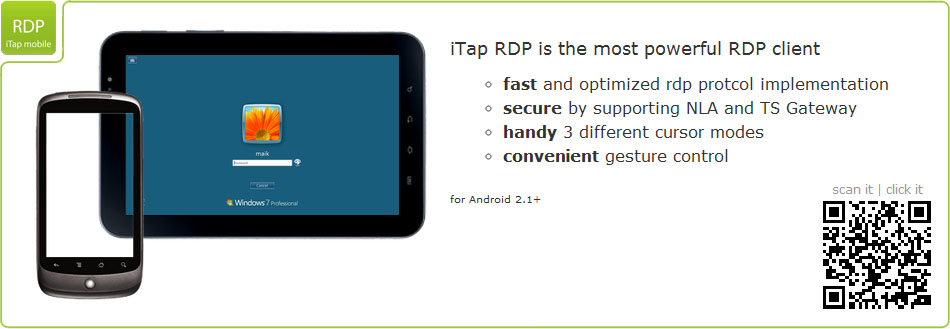
Manage your Windows desktop from your Android device. Utilizing the Microsoft RDP protocol, iTap mobile RDP gives you complete control and fast access from anywhere. Supports TS Gateway.

✔ FAST
With advanced compression and caching technologies, iTap mobile RDP allows you to use your Windows desktop conveniently, even when forced to use slower EDGE or GPRS connections. Compared to other Android clients iTap RDP can be more than twice as fast as the next best competitor.

✔ SECURE
iTap mobile RDP offers FIPS compliant security and support for NLA (Network Level Authentication). Additionally it is possible to automatically reconnect to existing sessions without storing passwords on your device.

✔ USABLE
Using the same convenient gestures as iTap mobile touchpad, iTap mobile RDP puts you in full control over your desktop. Whether you need to scroll, drag and drop, or just right-click, you can perform all your tasks without having extra buttons or bars cluttering up you screen.

Using our new desktop engine, you can access even huge desktops with full speed. In addition the sound of your windows desktop will automatically play on your Android device.

The built-in keyboard features all the keys and modifiers found on a traditional PC keyboard. Additionally it has full support for international languages, including eastern asian input methods.

The unique scope mode gives you precise control over your mouse and convenient drag-and-drop gestures, while still maintaining quick access to your complete desktop.

SUPPORTED REMOTE SYSTEMS :

    Windows XP Professional
    Windows XP Media Center 2005
    Windows Vista Business, Ultimate and Enterprise
    Windows Server 2000
    Windows Small Business Server 2003
    Windows Server 2003 (console and terminal server)
    Windows Server 2008 (console and terminal server)
    Windows Server 2008 R2 (console and terminal server)
    Windows 7 Professional, Enterprise and Ultimate

Features:

    Support for TS Gateway (RDP from Anywhere)
    Support for NLA (Network Level Authentication) and TLS security methods
    Native resolution support on all Android devices
    60% less bandwidth than any other RDP client on Android. This means twice the speed over slow networks!
    Huge Desktops. Up to the Windows limit of 4096x2048 pixels
    Sound support. Stream sound from Windows directly to your phone
    Built-in support wizard
    Unique scope mode for precise control of your remote desktop!
    Three different mouse input modes
    Automatic bandwidth reduction on 3G networks
    Automatic reconnect without needing to enter passwords
    Highest security (including NLA and FIPS compliant security protocols)
    Full international keyboard support
    Fully gesture based for maximum screenspace
    Compression and persistent Bitmap Cache for reduced bandwidth
    8, 16 and 24bit color modes
    Console sessions (Windows Server products)
    Remote Program support (start programs automatically on login)
    Convenient server search and reachability tests for bookmarks
    Remember multiple credentials per server
    Clipboard redirection
    SD card redirection
    App2SD
    Bookmark shortcut for homescreen

Please see our homepage for more information about Windows XP Home, Windows Media Center Edition, Windows Vista Home and Windows 7 Home and Starter. They do not work without 3rd party software!

What's in this version: (Updated : Apr 26, 2012)

    Rendering performance improvements
    New keyboard mode for handling on-device hardware keyboards
    Url Scheme for local RDP files wasn't working correctly on some Android versions
    Escape key on hardware keyboards wasn't forwarded

Required Android O/S : 2.1+


password: myandroid007.blogspot.com

BILA MERASA ARTIKEL INI BERMANFAAT DAN MAU DI COPY KE WEB TEMAN-TEMAN SAYA MOHON SERTAKAN NAMA WEB SITE YANG ANDA COPY 

Sobat Join Kesini yuk "Kampoeng Android Community"
mari kita berbagi ilmu disini

*